Your Credit Control AI Toolkit
Yesterday you saw why credit control is ripe for AI. Today you get equipped: which assistant to use, the one confidentiality rule you must never break, and three prompts to run before the end of the day.
The good news: the setup is genuinely ten minutes. You don't need new software, integrations, or an IT project. A general-purpose AI assistant in a browser tab covers most of what this course teaches.
The big three assistants
Three general-purpose assistants dominate, and for credit control work they're more alike than different:
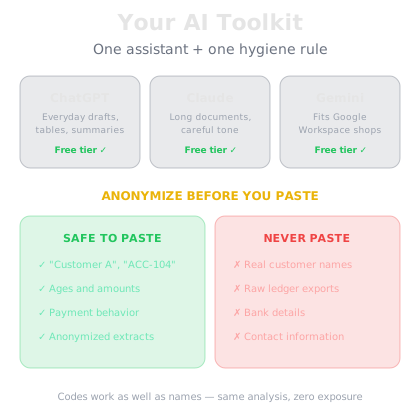
ChatGPT (OpenAI) — the most widely used, strong at drafting emails and restructuring messy data into tables and summaries.
Claude (Anthropic) — excels at long documents, careful reasoning, and nuanced tone — useful when a chaser needs to be firm without burning the relationship.
Gemini (Google) — integrates well if your business already runs on Google Workspace.
All three have free tiers that are plenty for this course. Paid plans (typically priced like a modest monthly software subscription) give you stronger models, longer documents, and more usage — worth it once AI becomes part of your daily routine, but not required to start. Pick one, create an account, and don't agonize: the prompts you'll learn work on all of them.
The confidentiality rule
Before you paste anything, burn this in: customer financial data is confidential. Never paste real customer names, account numbers, contact details, or full ledgers into a consumer chatbot.
Consumer AI tools may process your input on external servers, and depending on your settings it could be retained or reviewed. Your customers' payment histories, balances, and credit terms are sensitive business information — and in many jurisdictions, personal data rules apply too. Check your company's data policy and, if in doubt, ask your compliance or IT lead.
The working fix is simple: anonymize before you paste.
Do: replace names with codes ("Customer A", "ACC-104"), round or scale amounts if they're identifying, strip contact details, and keep only what the AI needs — ages, amounts, and payment behavior.
Never: paste a raw ledger export, credit application, or email thread containing real names, bank details, or personal information.
The pattern, the analysis, and the drafting all work exactly as well on "Customer A owes 12,400, 60 days overdue" as on the real name. You lose nothing by anonymizing — and you stay on the right side of your data obligations.
Three prompts to run today
Prompt 1 — Summarize an aged debtors report. Paste an anonymized extract and ask: "You are an experienced credit controller. Summarize this aged debtors extract: total overdue by bucket, the three accounts that need attention first and why, and any patterns I should worry about." Thirty seconds later you have the briefing that used to take an hour of squinting at rows.
Prompt 2 — Draft a polite chaser. "Draft a short, polite payment reminder for an invoice of 8,200 that is 10 days overdue. Professional and warm — this is a good customer who usually pays on time. Include the invoice number placeholder, the amount, and a clear ask for a payment date." You'll refine tone ladders on Day 8; today, just see how fast a send-ready draft appears.
Prompt 3 — Explain retention of title in plain English. "Explain what a retention of title clause is in a B2B supply contract, in plain English, and why it matters if a customer becomes insolvent. Keep it under 150 words." AI is excellent at turning legal concepts into plain language you can use in conversations — though actual contract wording always goes through a lawyer, as you'll see on Day 5.
Ten minutes, then compounding returns
That's the whole toolkit: one assistant, one hygiene rule, three prompts. Notice what just happened in the demo — a five-line extract became a ranked action plan with reasoning, and the AI offered to draft the emails on the spot. You'd still review every word before sending — but the blank page is gone forever.
Tomorrow you point this toolkit at the decision that prevents bad debt in the first place: checking a new customer before you extend credit terms.