Prompts That Actually Work
On Day 1 you saw the gap between "meh" and "mind-blowing." Today you learn the skill that closes it. Because the difference between a useless AI response and a brilliant one is almost never the AI — it's the prompt.
The good news: great prompting isn't a dark art. It's a formula with four parts, plus two upgrades. You'll have all of it in the next seven minutes.
The four-part power prompt
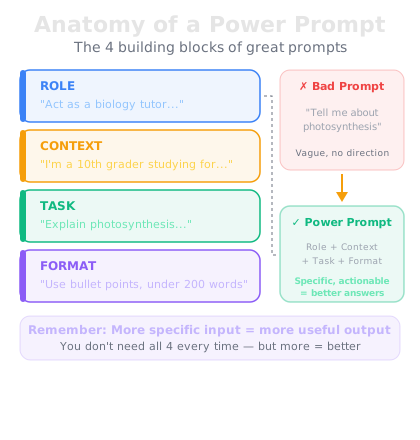
Every strong prompt contains the same four ingredients:
1. Role — Tell the AI who to be. "You are an experienced career coach." "Act as a friendly personal trainer." The role shapes the expertise, vocabulary, and judgment it draws on.
2. Context — Give background. "I'm applying for a marketing job after five years in teaching." "My budget is $2,000 and I have three weeks." The AI can't read your mind; context is how you let it in.
3. Task — Say exactly what you want. Not "help me with my CV" but "rewrite my professional summary to emphasize transferable skills."
4. Format — Specify the shape of the output. "A bulleted list." "Under 150 words." "A table comparing the options."
Bad prompt: "Help me write a cover letter."
Power prompt: "You are a hiring manager who has read thousands of cover letters. I'm applying for a customer success role at a software company; my background is five years in retail management [paste job posting]. Write a 200-word cover letter that connects my experience to their requirements. Confident but not arrogant, no clichés."
Same request. Completely different result.
Upgrade 1: show, don't describe
When you need output in a specific style or format, examples beat descriptions every time. This is called few-shot prompting: give the AI two or three examples of what "good" looks like, then ask it to follow the pattern.
Trying to describe your writing voice takes paragraphs and still misses. Pasting two emails you've actually written and saying "match this style" takes seconds and nails it. The same trick works for social posts, product descriptions, meeting notes — any time consistency matters.
The structure: paste your examples, label them clearly ("Here are two examples of our style:"), then give the new input and ask for the same pattern.
Upgrade 2: make it think out loud
For anything with logic, numbers, or trade-offs, add one line: "Think through this step by step before giving your final answer."
This is called chain-of-thought prompting, and it measurably improves accuracy. When the AI reasons in visible steps, each step builds on the last and errors get caught along the way instead of buried inside a one-shot answer.
Use it for comparing options, planning budgets, checking work, or any decision where the right answer isn't obvious. Compare: "Should I lease or buy a car?" gets you generalities. "I drive 20,000 miles a year, plan to keep the car 5 years, and have $5,000 down. Think through leasing vs. buying step by step — total cost, mileage penalties, depreciation" gets you an analysis you can actually use.
Your formula, starting now
From today onward, every prompt you write in this course uses this formula. Role, context, task, format — plus examples when style matters and "step by step" when logic matters.
One warning before tomorrow: a great prompt makes answers better, not automatically true. Remember Day 2 — the brilliant intern still invents things. Which is exactly why Day 5 exists.
Go deeper
Prompting is a deep skill, and the ChatGPT Masterclass dedicates multiple lessons to it — including advanced strategies like system-level framing and Thinking mode that build directly on today's formula. Bookmark it for after Day 28.
Tomorrow: how to fact-check any AI answer in under two minutes, like a pro.